

Assessments your institution can trust
One platform for every institution that runs exams
Whether you run an entrance test or a weekly test for one batch, the exam runs the same way.
-
Universities and colleges
Entrance tests, semester exams and certifications, with departments, batches and faculty roles set up the way your institution works.
- Departments, courses and batches as org units
- Exam admin, faculty and proctor roles
- Your own subdomain and branding
-
Certification and training bodies
Proctored certification exams, and certificates anyone can verify from a QR code.
- A Proctor Code and a live proctor
- Certificates with QR verification
- Exam fees paid online by candidates
-
Partners
Bring institutions onto AiSquare through your own partner console, with packages and commission tracked for you.
- Leads and onboarding
- Custom packages
- Commission ledger and settlements
Everything you need to run exams
Six parts of one platform, sharing one sign-in, one set of roles and one audit trail.
-
Question bank
Every question type, organised and versioned.
- Choice, numerical, matching, ordering, matrix and passages
- Subject, topic and subtopic
- Approved versions never change
- Import with an error report
-
Assessment builder
Reusable blueprints with sections, rules and timing.
- Sections with their own timers
- Manual or random selection
- Pools checked before you publish
- Negative marking and pass marks
-
Scheduling and delivery
From the exam wizard to the last submission.
- Fixed or flexible windows
- Invitations by e-mail
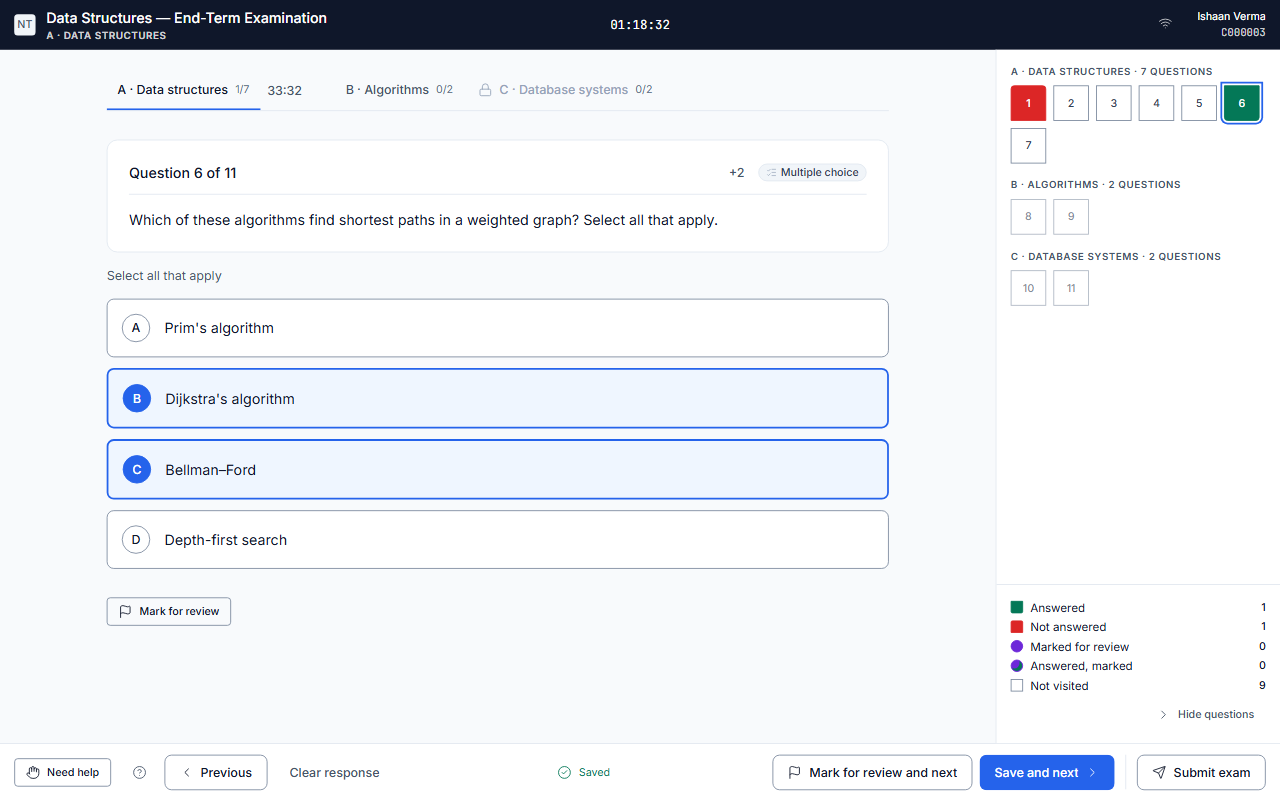
- Server-side timer and autosave
- Resume after a dropped connection
-
Proctoring
Browser-level proctoring with a live proctor.
- A Proctor Code to begin
- Tab switches and copy attempts logged
- Incidents and a risk score
- Warn, pause, extend or end an attempt
-
Results and reports
Scored the moment an exam ends, published when you choose.
- Every question type scored automatically
- Ranks and percentiles
- Question and topic analysis
- CSV, Excel and PDF exports
-
Certificates
Issued automatically on a pass, verifiable by anyone.
- Templates and gap-free numbering
- A PDF with a QR code
- A public verification page
- Revoke or expire at any time
Why AiSquare
Exam integrity is built in, not bolted on
-
The timer and the answer keys stay on the server
The clock runs on our server, not in the browser, and answer keys are never sent to a candidate's device.
-
Proctoring is built in
Browser-level proctoring and a live proctor are part of the exam, not a separate tool to install.
-
One tenant per institution
Each institution has its own subdomain or domain, branding, roles and org units, and its data is kept apart from every other.
-
Certificates anyone can verify
A QR code on every certificate opens a public page that confirms whether it is valid, revoked or expired.
-
Security and privacy by default
Two-factor sign-in for administrators, an audit log that cannot be edited, encrypted backups, and tools for data export and erasure.
How an exam runs on AiSquare
-
Before the exam
Build and schedule
- Write or import questions
- Build the paper from sections and pools
- Schedule it and invite candidates
-
During the exam
Sit and proctor
- The proctor shares the Proctor Code
- The server keeps time and saves every answer
- The live proctor can warn, pause or extend
-
After the exam
Score and certify
- Scores are calculated automatically
- Results are published when you are ready
- Certificates are issued on a pass
Frequently asked
What is AiSquare?
An online examination platform for institutions. It covers the question bank, assessments, scheduling, browser-level proctoring, automatic scoring, results and certificates, with each institution on its own subdomain.
How are exams proctored?
Browser-level proctoring records tab switches, copy and paste attempts and lost focus, and a live proctor can watch the candidate list in real time and warn, pause, extend or end an attempt.
Does AiSquare use the webcam?
No. Proctoring in AiSquare today is browser-level, with a live proctor watching the candidate list. Camera, video and automated face detection are not part of the product.
Can candidates take exams on a phone?
Yes. The exam player works in a phone's browser as well as on a laptop, with the same timer and autosave.
What happens if a candidate's connection drops?
Answers are saved as the candidate works and held while the device is offline. When the candidate comes back, the same paper opens with the correct time remaining.
Can we use our own domain?
Yes. An organisation can serve its candidates on its own domain with its own certificate.